
Every device that joins your network needs an IP address, a gateway, and a few other settings. Yet you never type any of that in — you just connect, and it works. The system behind that convenience is DHCP: the Dynamic Host Configuration Protocol.
What DHCP does
DHCP automatically assigns network settings to devices as they join. Instead of configuring each phone, laptop, and tablet by hand, a DHCP server — usually built into your router — hands out everything a device needs:
- An IP address (from a managed pool).
- The subnet mask and default gateway.
- DNS server addresses.
- A lease time — how long the address is valid before it must be renewed.
The DHCP handshake: DORA
When a device connects, it completes a quick four-step exchange, often remembered by the acronym DORA:
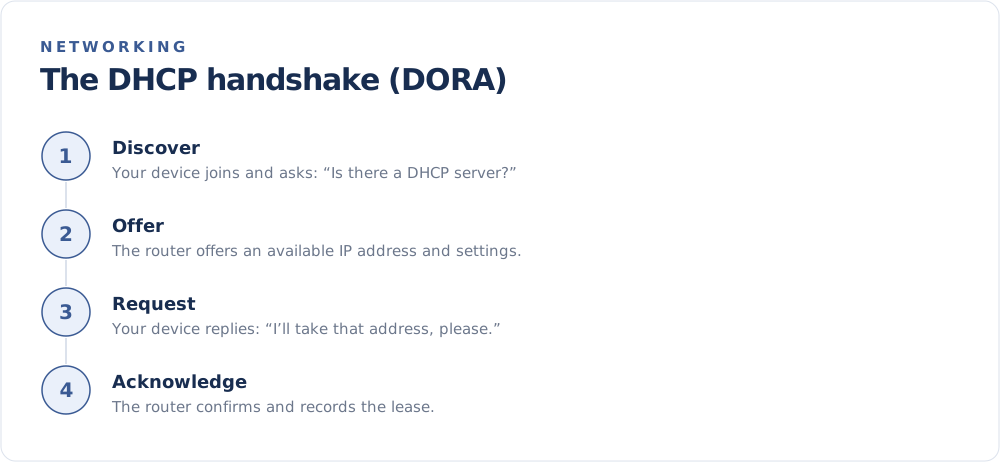
- Discover — the new device broadcasts a request: "Is there a DHCP server here?"
- Offer — the server replies with an available IP address and settings.
- Request — the device formally asks to use the offered address.
- Acknowledge — the server confirms and records the lease.
The whole exchange happens in a moment, which is why connecting feels instant.
Leases and renewals
DHCP addresses are not permanent — they are leased for a set period. Before a lease expires, your device asks to renew it. Usually it keeps the same address, but it may receive a different one, which is part of why your IP address can change.
This leasing system is exactly what makes most home connections dynamic rather than static. For the distinction, see Static vs Dynamic IP Addresses.
DHCP reservations
Want a device to always get the same private address — handy for a printer or a server you forward ports to? Most routers let you create a DHCP reservation, tying a specific address to a device. You get the convenience of automatic configuration with the predictability of a fixed address.
When DHCP goes wrong
A few familiar issues trace back to DHCP:
- "Limited connectivity" can mean a device failed to obtain an address — restarting usually helps.
- IP conflicts happen if two devices end up with the same address; rebooting the router resolves most.
- A full address pool on a busy network can leave new devices unable to join until leases free up.
The takeaway
DHCP is the unsung hero of easy networking: it configures every device that connects, manages a pool of addresses through leases, and keeps your network running without manual setup. It is also the reason your public and private addresses can shift over time. See the public address your connection currently holds on the FindMyIP home page.