
Every time you open a website, stream a video, or send a message, your device needs a way to be found on the internet. That is the job of an IP address — short for Internet Protocol address. It is a unique label that identifies your connection so information can be delivered to the right place.
Think of it as the return address on a letter. When your device asks a website for a page, that request carries your IP address. The website uses it to know exactly where to send the reply.
What an IP address looks like
Most people still see the older style of address, called IPv4. It is four numbers separated by dots, each between 0 and 255:
192.168.1.42
A newer format, IPv6, uses longer addresses with letters and numbers to provide many more combinations. If you want the full comparison, see IPv4 vs IPv6.
How your request finds its way back
Your IP address is only one stop in a short chain. Your device talks to your router, your router talks to your internet provider, and your provider connects you to the wider internet.
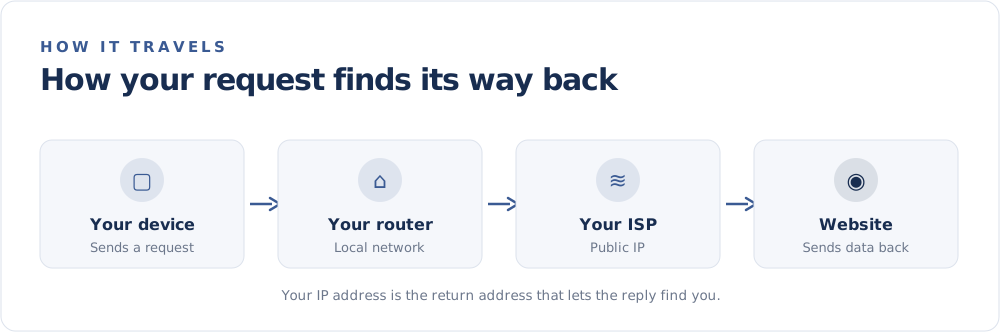
The website never sees every device in your home individually. It sees the single public IP address your internet provider assigns to your connection. The difference between that public address and the private ones inside your home is explained in Public vs Private IP Addresses.
Who gives you an IP address?
You do not choose your own public IP address — your internet service provider (ISP) assigns it. Behind the scenes, global registries hand out large blocks of addresses to providers, who then share them among their customers.
Most home connections receive a dynamic address that can change from time to time, rather than a fixed one. You can read more in Can My IP Address Change? and Static vs Dynamic IP Addresses.
Does my IP reveal where I live?
Not precisely. An IP address can be matched to an approximate area — often your city or region — but it does not reveal your street address or your name. The location you see is really the location of your network, which is why it can look surprisingly far off. We cover the reasons in Why Is My IP Location Wrong?.
The quick version
- An IP address identifies your connection so data can reach you.
- Your ISP assigns the public address the rest of the internet sees.
- It points to a network and an approximate area — not your exact home.
- It can change, especially on home and mobile connections.
Curious what yours is right now? Head to the FindMyIP home page to see your public IP address and approximate location instantly — no sign-up required.