
When your internet provider gives your connection a public IP address, it is either static (fixed) or dynamic (changeable). Both work for everyday browsing, but the distinction matters if you ever host a service or need reliable remote access.
Dynamic IP addresses
A dynamic IP address is assigned automatically and can change over time. Your provider manages a pool of addresses and leases one to your connection using a system called DHCP. When the lease renews — or when you reboot your router — you might receive a different address.
This is the default for most home connections, and for good reason:
- It costs nothing extra.
- It lets providers reuse addresses efficiently.
- It is perfectly fine for browsing, streaming, gaming, and video calls.
Static IP addresses
A static IP address stays the same. It is either configured manually or permanently reserved for your connection, so it does not change when you reconnect.
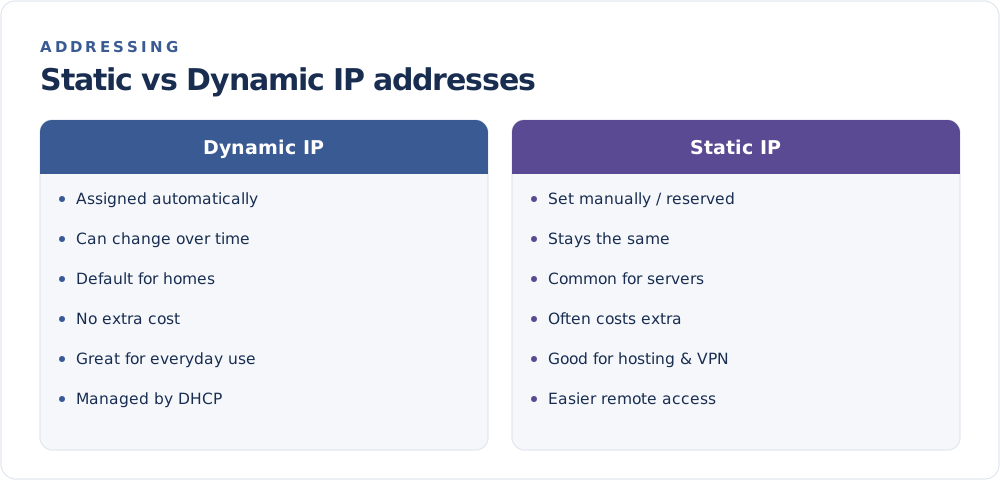
Static addresses are useful when something needs to find you at a predictable location:
- Hosting a website or game server that others connect to.
- Remote access to a home computer, camera, or network drive.
- Business services like a company VPN or mail server.
- Port forwarding setups that must point to a consistent address.
The trade-off: providers often charge extra for a static IP, and a fixed address can be marginally easier to track over time.
Which one do you have?
Most home users have a dynamic address. A quick way to check: note your public IP on the FindMyIP home page today, then look again after rebooting your router or a few days later. If it changes, it is dynamic.
If you are not sure or want a static address, your internet provider can confirm what your plan includes.
Which should you choose?
| Need | Better fit |
|---|---|
| Everyday browsing and streaming | Dynamic |
| Running a server or site at home | Static |
| Reliable remote access | Static |
| Lowest cost | Dynamic |
For most people, a dynamic address is the sensible default. Choose static only when you have a specific reason to keep the same address every time. And remember — whichever you have, you can still change what the world sees by hiding your IP address.