
You type example.com, not a string of numbers — yet computers connect using IP addresses. The system that bridges the two is DNS, the Domain Name System. It is often called the internet's phone book, and it quietly runs behind nearly everything you do online.
The problem DNS solves
Every website lives at an IP address, like 93.184.216.34. Those are easy for machines but hard for humans to remember. DNS lets us use friendly names while computers use the numbers underneath.
How a DNS lookup works
When you enter a web address, your device asks a DNS resolver (usually run by your provider or a public service) to find the matching IP. The resolver checks a chain of name servers until it gets the answer, then hands the IP back to your browser, which makes the actual connection.
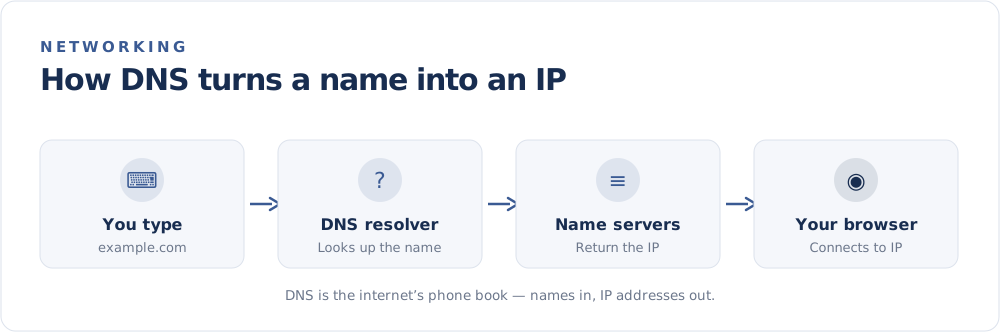
The whole process usually takes a fraction of a second, and results are cached (temporarily remembered) so repeat visits are even faster.
The key pieces
- Resolver — the service that does the lookup on your behalf.
- Root and TLD servers — direct the query toward the right domain (
.com,.org, and so on). - Authoritative name server — holds the real records for a domain and returns the IP.
- Records — entries like an
Arecord (maps a name to an IPv4 address) orAAAArecord (to an IPv6 address).
DNS and your privacy
DNS lookups can reveal which sites you visit, even when the pages themselves are encrypted. A few things help:
- Encrypted DNS (DNS over HTTPS or TLS) hides your lookups from others on the network.
- A VPN typically routes DNS through its own resolvers, keeping queries private from your provider.
- Choosing a trusted resolver matters, since it sees every name you request.
Why DNS sometimes causes problems
If a site won't load but others will, DNS is a common culprit:
- Stale cache — clearing your DNS cache or restarting can fix it.
- Resolver outage — switching to a reliable public resolver often helps.
- Propagation delay — after a site changes its IP, the update can take time to spread.
The takeaway
DNS and IP addresses are two halves of the same system: DNS provides the human-friendly names, and IP addresses provide the machine-friendly destinations. Together they turn a typed address into a working connection.
Want to see the IP side of the equation for your own connection? Check it on the FindMyIP home page.