
The internet has two addressing systems running side by side: IPv4 and IPv6. Both do the same core job — give every connection a unique address — but they were designed decades apart, and the differences matter.
The short answer
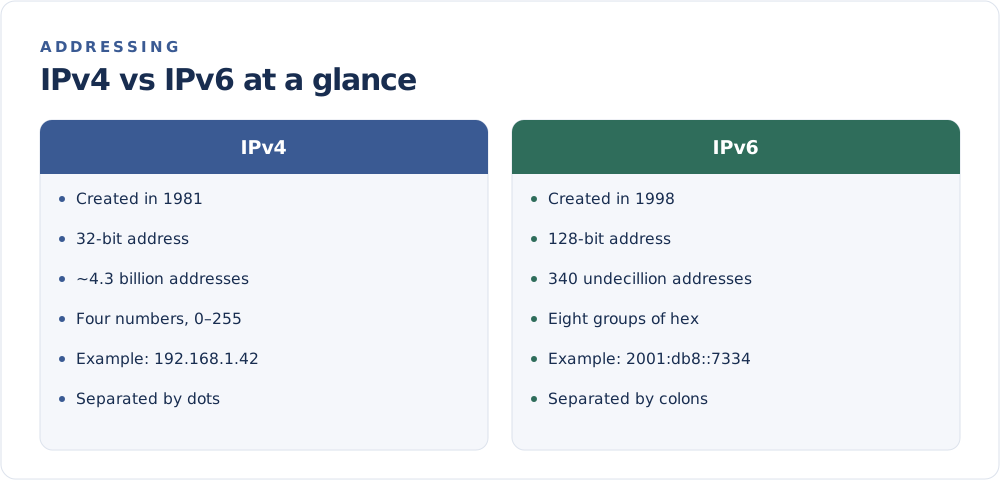
IPv4 is the original system from the early 1980s. It can produce about 4.3 billion unique addresses, which once seemed endless. With billions of phones, laptops, smart TVs, and other devices online, the world began running out. IPv6 was created to solve that shortage with a vastly larger pool of addresses.
How they are written
An IPv4 address is four numbers from 0 to 255, separated by dots:
203.0.113.42
An IPv6 address is eight groups of hexadecimal characters, separated by colons. Long runs of zeros can be shortened with a double colon:
2001:0db8:0000:0000:0000:0000:0000:7334
2001:db8::7334
Why IPv6 has so many more addresses
IPv4 uses 32 bits per address, giving roughly 4.3 billion combinations. IPv6 uses 128 bits, which produces about 340 undecillion addresses — a 340 followed by 36 zeros. In practical terms, that is more than enough for every device imaginable, with room to spare for decades.
What this means for you
For everyday browsing, you usually do not need to think about which version you are using. Your device and network handle it automatically, and most modern systems support both at once (called dual stack).
A few things are worth knowing:
- You may have both. Many connections are assigned an IPv4 and an IPv6 address at the same time.
- Some sites still prefer IPv4. Compatibility techniques like NAT let many devices share a single IPv4 address, which has slowed the pressure to switch.
- Your visible address depends on the site. A website might record your IPv6 address while another logs your IPv4 one.
Will IPv4 ever disappear?
Not quickly. The transition has been gradual for years, largely because workarounds like NAT stretched the remaining IPv4 supply. Expect both systems to coexist for a long time, with IPv6 steadily taking on more traffic.
Want to see which address your connection is showing right now? Check it on the FindMyIP home page — it labels whether you are on IPv4 or IPv6.