
If you have ever checked the IP address on your laptop and found it different from the one a website reports, you have met the two kinds of IP address: private and public. They work together, and understanding the split clears up a lot of confusion.
Private IP addresses: inside your home
A private IP address identifies a device within your local network — your laptop, phone, printer, or smart speaker. Your router hands these out so devices can talk to each other and share the connection.
Private addresses come from reserved ranges that are never used directly on the public internet:
10.0.0.0    – 10.255.255.255
172.16.0.0  – 172.31.255.255
192.168.0.0 – 192.168.255.255
That is why so many home devices have an address like 192.168.1.5. These addresses are reused in millions of homes at once, which is perfectly fine because they never leave your network.
Public IP addresses: facing the internet
A public IP address is the single address your internet provider assigns to your whole connection. It is unique on the internet, and it is what websites, apps, and services actually see.
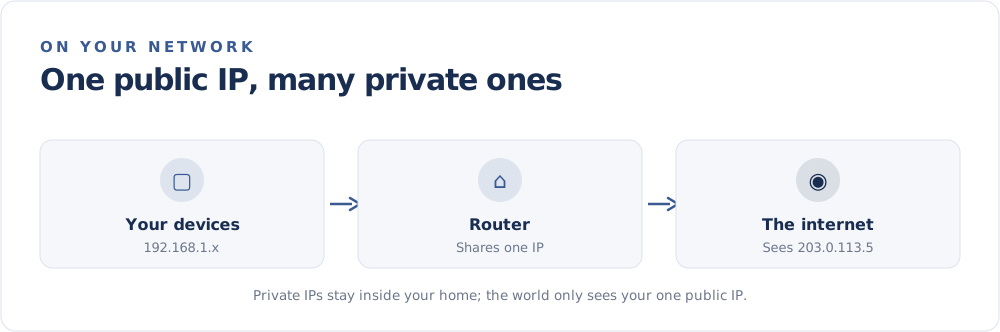
How one public IP serves many devices
Your router performs a clever trick called Network Address Translation (NAT). When your phone and laptop both reach out to the internet, the router swaps their private addresses for the shared public one, keeps track of who asked for what, and routes each reply back to the right device. We explain this fully in What Is NAT?.
This is also why a single home connection can run dozens of devices while the outside world sees just one address.
How to tell which is which
- Private addresses start with
10.,172.16–172.31, or192.168. - Public addresses are everything else your ISP assigns.
To find your private address, check your device's network settings. To find your public one, simply visit the FindMyIP home page — the address shown there is the public one the internet sees. For step-by-step instructions on each device, see How to Find Your IP Address.
Why the distinction matters
- Privacy: Only your public IP is visible to websites, and it points to your network, not your exact home.
- Troubleshooting: Setting up a printer or game console often means using private addresses.
- Hosting and remote access: Features like port forwarding connect a public request to a specific private device.
In short: private addresses organize your home network, and your public address represents all of it to the rest of the internet.