
Your home might have a phone, a laptop, a smart TV, and a game console all online at once — yet the internet sees just one public IP address for your whole connection. The technology that makes this possible is NAT: Network Address Translation.
The job NAT does
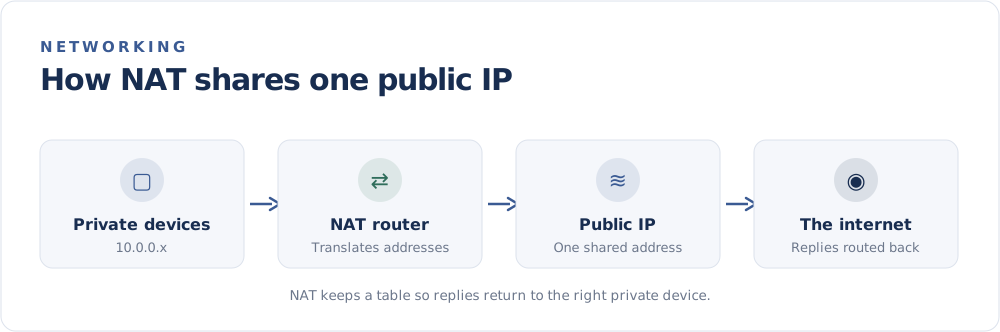
Every device on your home network has a private IP address like 192.168.1.10. Those addresses only work inside your network. To reach the internet, traffic needs your single public IP address.
NAT, running on your router, translates between the two. When a device sends a request out, the router swaps the private address for the public one. When the reply comes back, it swaps it back to the right private address.
How the router keeps track
The router maintains a translation table. For each outgoing connection, it notes which private device made the request and assigns a tracking entry (using port numbers — see Ports and Port Forwarding). When data returns, the router checks the table and forwards it to the correct device. This is sometimes called PAT (Port Address Translation) or "NAT overload," because many devices share one address through different ports.
Why NAT exists
NAT became widespread for two reasons:
- Conserving IPv4 addresses. With only about 4.3 billion IPv4 addresses, letting entire households share one dramatically stretched the supply.
- A side benefit for privacy and security. Because inside devices are not individually addressable from the internet, unsolicited inbound traffic has no default path in.
NAT and incoming connections
NAT is great for outgoing requests, but it complicates incoming ones. If you host a game server or want to reach a home camera from outside, the router does not know which inside device the request is for. That is where port forwarding comes in — you tell the router to send a specific port to a specific device.
Does IPv6 still need NAT?
Largely no. IPv6 has so many addresses that every device can have its own public one, removing the original reason for NAT. During the long transition, though, NAT remains everywhere on IPv4 connections.
The takeaway
NAT is the quiet workhorse that lets one public IP serve a whole home. It conserves addresses, adds a layer of separation from the open internet, and is the reason your laptop and your public IP look so different. To see the single public address NAT presents to the world for your connection, visit the FindMyIP home page.