
A VPN — Virtual Private Network — is one of the most popular tools for protecting your privacy online. At its core, it does two things: it encrypts your internet traffic and it hides your real IP address. Here is how, without the jargon.
The simple idea
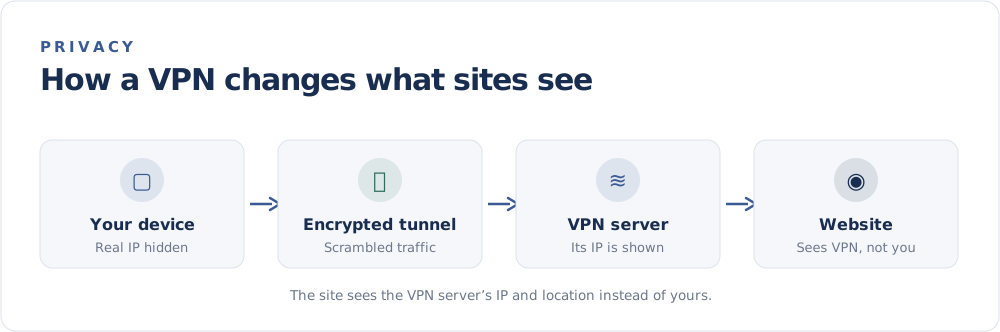
Normally, your device connects straight to a website, and that site sees your public IP address. With a VPN, your traffic first travels through an encrypted "tunnel" to a VPN server. The server then forwards your request to the website.
The result: the website sees the VPN server's IP address and location — not yours.
What a VPN does well
Hides your IP address
Websites and services see the server's address, so your real one — and the approximate location tied to it — stays private. This is why a VPN is the go-to method in How to Hide Your IP Address.
Encrypts your traffic
On public Wi-Fi especially, encryption stops others on the same network from snooping on what you send and receive.
Lets you appear elsewhere
Because you take on the server's location, you can connect as though you were in another city or country. This is handy for accessing region-specific services while travelling.
What a VPN does not do
A VPN is powerful but not magic:
- It is not full anonymity. Your VPN provider can see your traffic, so choose a reputable one with a clear no-logs policy.
- It does not stop all tracking. Cookies, browser fingerprinting, and logging into accounts can still identify you.
- It does not protect against malware. You still need good security habits.
For how it compares to other tools, see VPN vs Proxy vs Tor.
How to choose a VPN
- Reputation and transparency — independent audits and a no-logs policy.
- Speed — a good provider adds little noticeable slowdown.
- Server choice — more locations mean more flexibility.
- Clear pricing — be wary of "free" VPNs that monetize your data.
Should you use one?
If you regularly use public Wi-Fi, want to keep your IP private, or need to reach services from another region, a VPN is a solid, mainstream choice. For everyday browsing at home, it is optional — but it never hurts to understand what your IP reveals first. See What Can Someone Do With Your IP Address?, then check your current address on the FindMyIP home page.