
Whether you want more privacy, need to get around an IP block, or simply want to appear in another location, you have several ways to change or hide your IP address. Here are the main options, from easiest to most private.
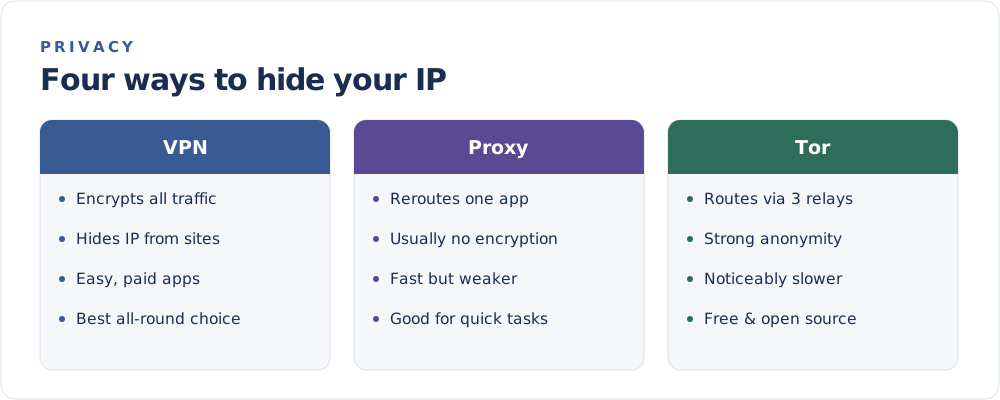
1. Use a VPN (best all-round)
A VPN routes your traffic through an encrypted tunnel, so websites see the server's IP instead of yours. It is the most popular choice because it is easy, covers your whole device, and encrypts your traffic along the way.
Best for: everyday privacy, public Wi-Fi, and appearing in another location.
2. Use a proxy server
A proxy reroutes traffic for a single app or browser, swapping your visible IP for the proxy's. Most proxies do not encrypt your traffic, so they are faster but weaker on privacy.
Best for: quick, low-stakes rerouting of one app.
3. Use the Tor network
Tor sends your traffic through several volunteer-run relays, wrapping it in layers of encryption. This provides strong anonymity, at the cost of noticeably slower speeds.
Best for: maximum anonymity when speed is not the priority.
The three options above are compared head-to-head in VPN vs Proxy vs Tor.
4. Switch networks or reset your connection
You can also change your public IP without any special software:
- Switch to mobile data (or vice versa) — a different network means a different IP.
- Restart your router to request a fresh address from your provider, if you have a dynamic IP.
- Connect from a different location, such as a café's Wi-Fi.
This changes your address but does not hide or encrypt anything — the new network simply sees the new IP.
Which should you pick?
| Goal | Best method |
|---|---|
| Overall privacy and ease | VPN |
| Reroute a single app quickly | Proxy |
| Strongest anonymity | Tor |
| Just get a different IP | Switch networks |
A quick reality check
Hiding your IP improves privacy, but it is only part of the picture. Cookies, logins, and browser fingerprinting can still identify you. And as What Can Someone Do With Your IP Address? explains, your IP alone reveals less than many people fear.
Try a method, then confirm the result on the FindMyIP home page — if the address and location have changed, it is working.